Automated Cyber Range Deployments with Ludus and Claude, Part 2: Watching It, and Getting It Right
This continues from Part 1, which built the range and made it observable.
Where Part 1 left off
Part 1 went from a paragraph of description to six VMs on two VLANs: an Apache/PHP document portal in the DMZ, a MariaDB document store on the LAN, and three analyst workstations, with a default-REJECT posture between the VLANs and exactly two permitted crossings. It also put a passive tap on the range that mirrors every VM’s traffic without changing what the VMs see, and a small role on the analyst boxes that generates continuous, realistic activity for that tap to capture.
What the range still lacked was somewhere for its own telemetry to land, and anyone watching. This part adds the SIEM, and then does the thing I find easiest to skip once everything looks green: reviewing the whole build carefully enough to find what is actually wrong with it.
Entry 4 - A SIEM the analysts can actually use
Three analyst boxes looking at a portal is an incomplete scenario. A SOC’s job is to watch, so the next addition was a real SIEM, Wazuh, giving the analysts something to investigate and giving the range a place for its own telemetry to land.
Where it sits, and why that mattered
I had a choice: put Wazuh on the existing LAN next to the analysts, or give it its own SOC/management VLAN.
Everything about this range has favored segmentation, so the SOC VLAN won: VLAN 30, 10.1.30.10, on its own broadcast domain behind the same default-REJECT posture as everything else.
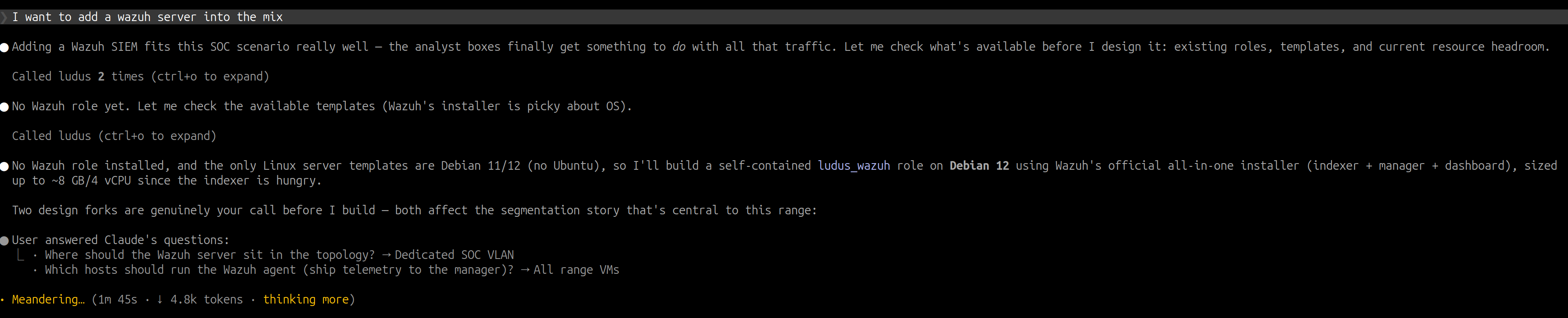
That decision determines the firewall rules. Monitoring only works if telemetry can cross boundaries deliberately, so four new rules were opened, and nothing more:
- web01 (DMZ) to the manager on 1514/1515 (agent events and enrollment)
- the database (LAN) to the manager on 1514/1515
- the analysts (LAN) to the manager on 1514/1515
- the analysts to the dashboard on 443
Two roles implement it.
ludus_wazuh runs Wazuh’s official all-in-one installation assistant (indexer, manager, and dashboard) on an 8 GB / 4 vCPU VM.
ludus_wazuh_agent installs the agent on the five other VMs and enrolls each one with the manager by hostname.
Wazuh only guarantees compatibility when the manager is the same version as its agents or newer, and the installation assistant installs whatever patch release is newest on the day it runs.
So the manager is the source of truth: each agent entry in the range config declares depends_on the ludus_wazuh role, and the agent role reads the manager’s installed version and installs and holds exactly that.
I learned this the hard way: pinning agents to the 4.14.* release line let a later redeploy move them to 4.14.7 while the manager stayed on 4.14.6.
Entry 5 covers that in detail.
One thing a reviewer should flag in those rules: agents enroll over 1515 with no enrollment password. Wazuh’s default lets anything that can reach 1515 register itself as an agent, so here the firewall rules are the only thing deciding who can enroll. For a lab where I control every host, that’s acceptable. Anywhere else, I’d turn on password-based enrollment so a host also needs a shared secret before it can enroll.
The detour: an “unsupported” OS and a trust-store problem
This entry did not go cleanly on the first try, which is why it is worth writing down.
First question: the range runs Debian 12, and Debian isn’t on Wazuh’s supported list.
I had Claude read the installer’s source to find out.
The current installation assistant only warns on an unsupported OS and continues, and Wazuh ships Debian apt packages, so it installs fine with -i.
There was no need to move the whole range to Ubuntu.
Reading the installer mattered for a second reason: the role downloads wazuh-install.sh and runs it as root.
The download is over verified TLS from packages.wazuh.com, but the role doesn’t pin a checksum, so it trusts whatever that URL serves on the day it runs.
With a pinned hash, an unexpected change to the script would fail the deploy before the script ever ran.
Then the deploy failed twice, with the same error in two places:
1
2
3
ludus_wazuh_agent : Fetch the Wazuh apt signing key
fatal: [admin-web01]: SSL: CERTIFICATE_VERIFY_FAILED ...
  unable to get local issuer certificate  (packages.wazuh.com)
The base VM template ships without a populated CA trust store, so Ansible’s get_url couldn’t verify TLS to packages.wazuh.com.
(curl had worked earlier only because it was hitting internal HTTP.)
Setting validate_certs: false would have made the error go away by turning off the check that caught the problem, on the very download that fetches the signing key for every Wazuh package after it.
I left verification on and fixed the trust store, which takes one step: refresh ca-certificates before any HTTPS fetch.
The one place the roles do skip verification is a call to the Wazuh indexer on localhost, whose certificate is self-signed by the installer.
The interesting part was the shape of the failure: it surfaced first in the agent role, I fixed it there and redeployed, and it reappeared in the server role, which needed the identical fix.
One root cause in two roles, found one deploy at a time.
Fast, idempotent redeploys made that loop cheap: the manager install is guarded by a creates: check, so re-runs skip the 15-minute install step.
One more lab-specific setting is built into the role.
The Wazuh indexer switches its indices to read-only once the disk passes about 85% usage, which silently stops ingestion.
On a small lab disk that is likely to happen, so the role raises vm.max_map_count and disables the disk watermark up front.
For a disposable lab, that’s an acceptable trade: the indexer keeps ingesting, at the risk of filling the disk completely.
In production, I’d leave the watermark on and size the disk and index retention to fit.
Proof it works
The real test is whether the SIEM can see the range.
The dashboard answers on https://10.1.30.10 (a 302 to the login page):

Asking the manager which agents have checked in shows the rest:
1
2
3
4
5
6
7
8
$ /var/ossec/bin/agent_control -l
Wazuh agent_control. List of available agents:
   ID: 000, Name: admin-wazuh (server), IP: 127.0.0.1, Active/Local
   ID: 001, Name: admin-soc3,    IP: any, Active
   ID: 002, Name: admin-soc2,    IP: any, Active
   ID: 003, Name: admin-soc1,    IP: any, Active
   ID: 004, Name: admin-database, IP: any, Active
   ID: 005, Name: admin-web01,   IP: any, Active
The dashboard’s Endpoints view shows the same five agents, all on Debian 12 and all running v4.14.6:
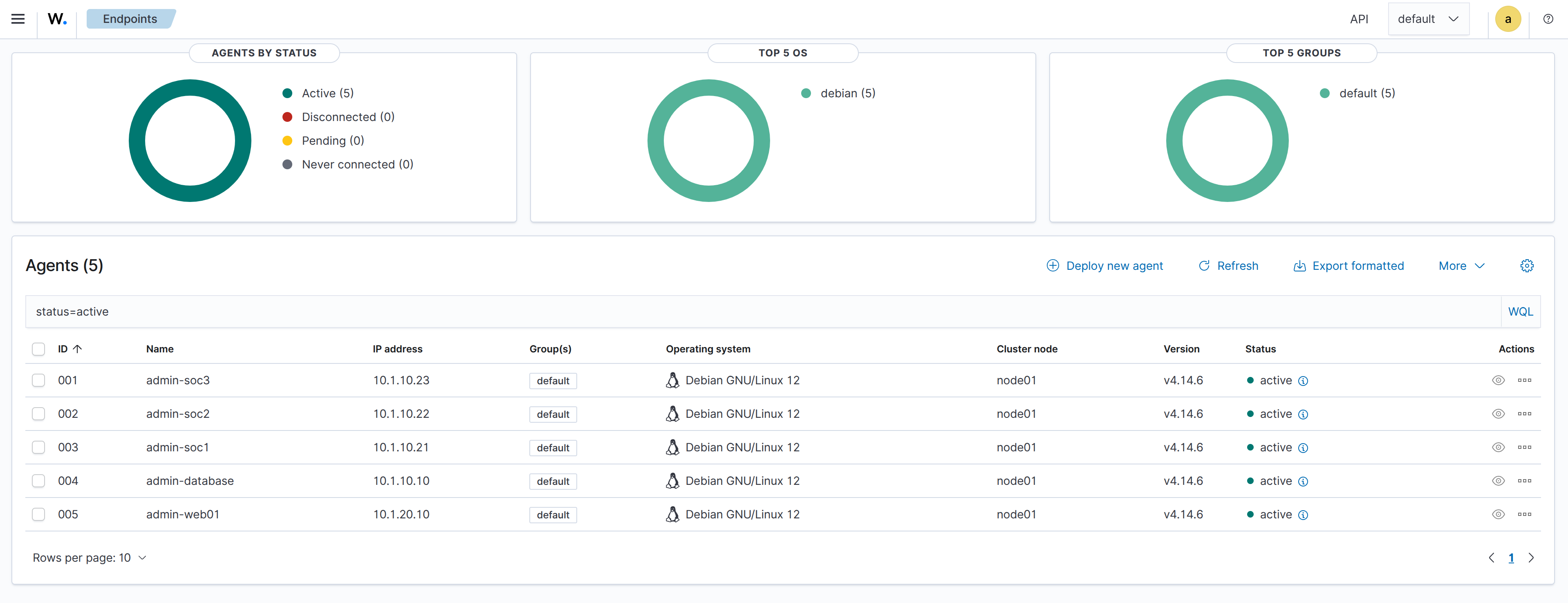
Every host is Active, including admin-web01, whose agent reports from the DMZ across the VLAN boundary through exactly the 1514/1515 rule opened for it, and nothing wider.
The traffic generator from Entry 3 is still running underneath all of this, so the SIEM is watching live analyst-to-portal-to-database activity.
(Dashboard credentials are generated per deploy and saved to /root/wazuh-credentials.txt on the manager.
They are deliberately not included here.)
What the SIEM saw on its first day
Agents checking in is the minimum. The more useful question is what Wazuh had found after watching the range for a day, so I went back and captured a few of its views.
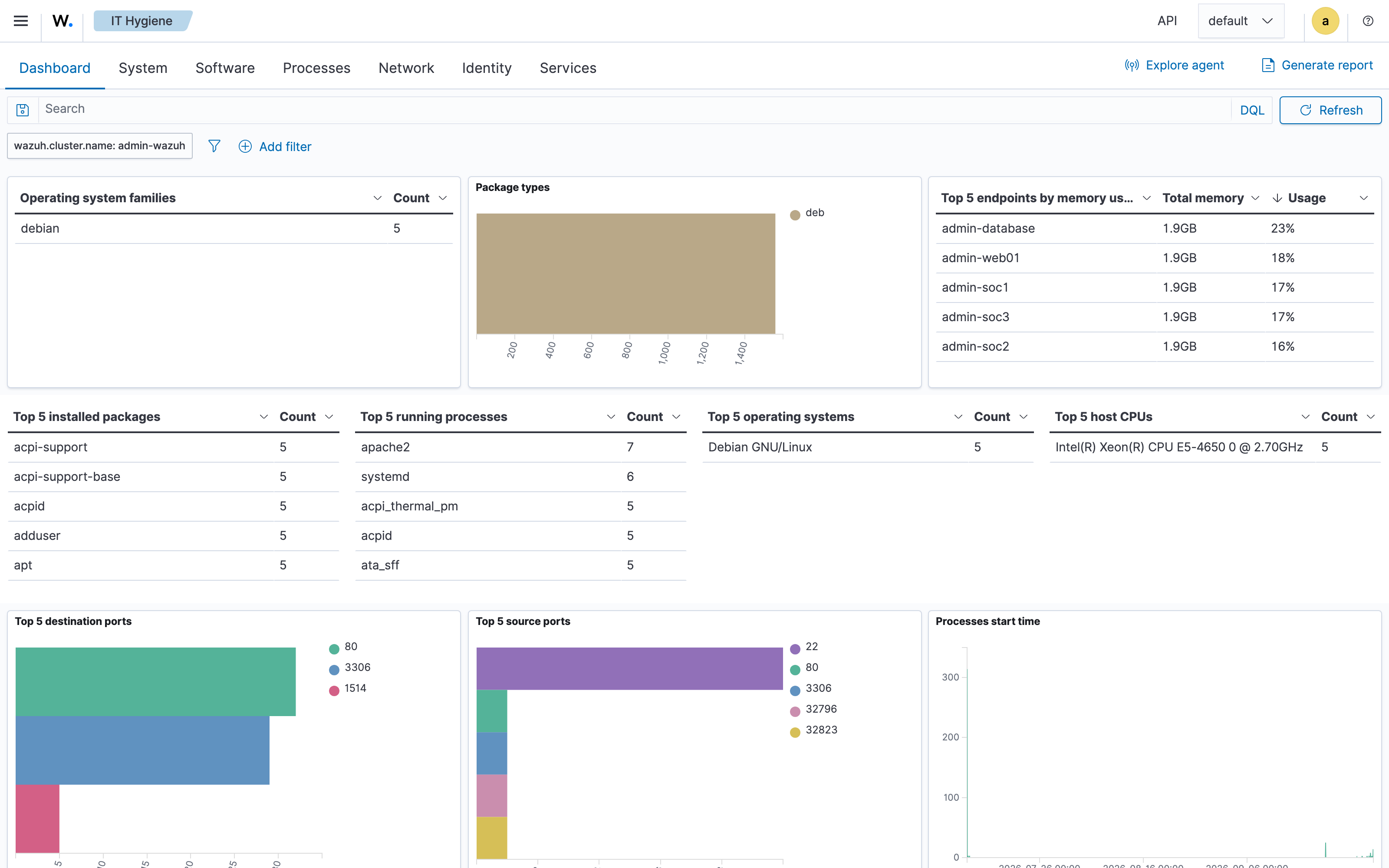
The traffic matches the firewall. The IT Hygiene view summarizes network activity across all five agents. The top destination ports are 80, 3306, and 1514: analysts browsing the portal, the portal querying the database, and agents reporting to the manager. Those are the flows the firewall allows, and this time the hosts themselves are reporting them.
It caught Claude guessing usernames.
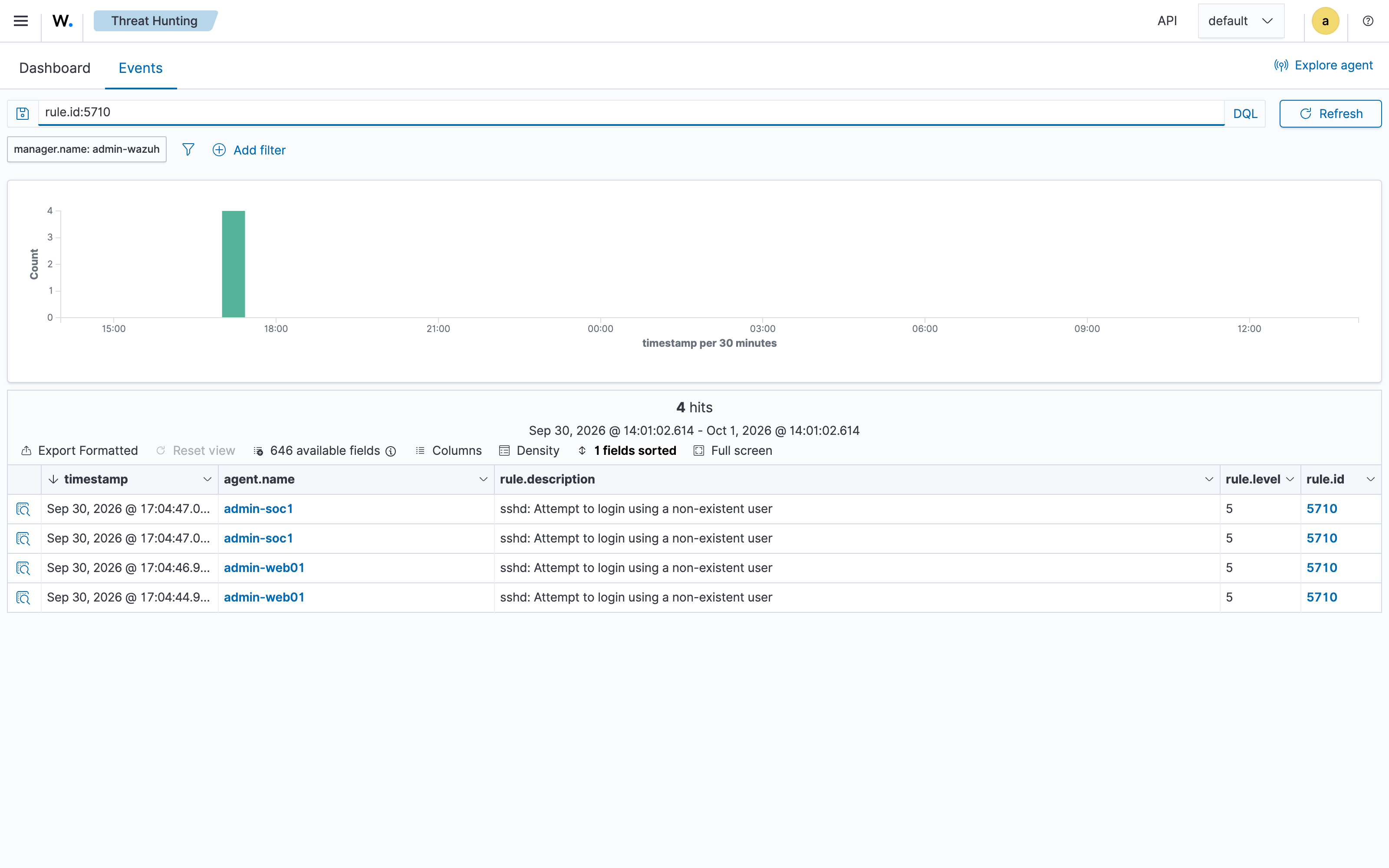
Threat Hunting showed four authentication failures and a MITRE ATT&CK “Password Guessing” hit.
Filtering on the rule shows all four: sshd: Attempt to login using a non-existent user on web01 and soc1, within three seconds of each other, from 198.51.100.3.
That address is my laptop on the VPN.
While checking the range for this post, Claude Code tried localuser and admin, among other usernames, to find out which account the VMs accepted.
That’s exactly the behavior a SIEM should flag, and it doesn’t matter that the agent doing it was mine.
It’s also a reminder of why Part 1 argues for giving the agent a scoped account: an AI agent probing for valid usernames looks the same in the logs as an attacker doing it.
The hosts aren’t hardened.
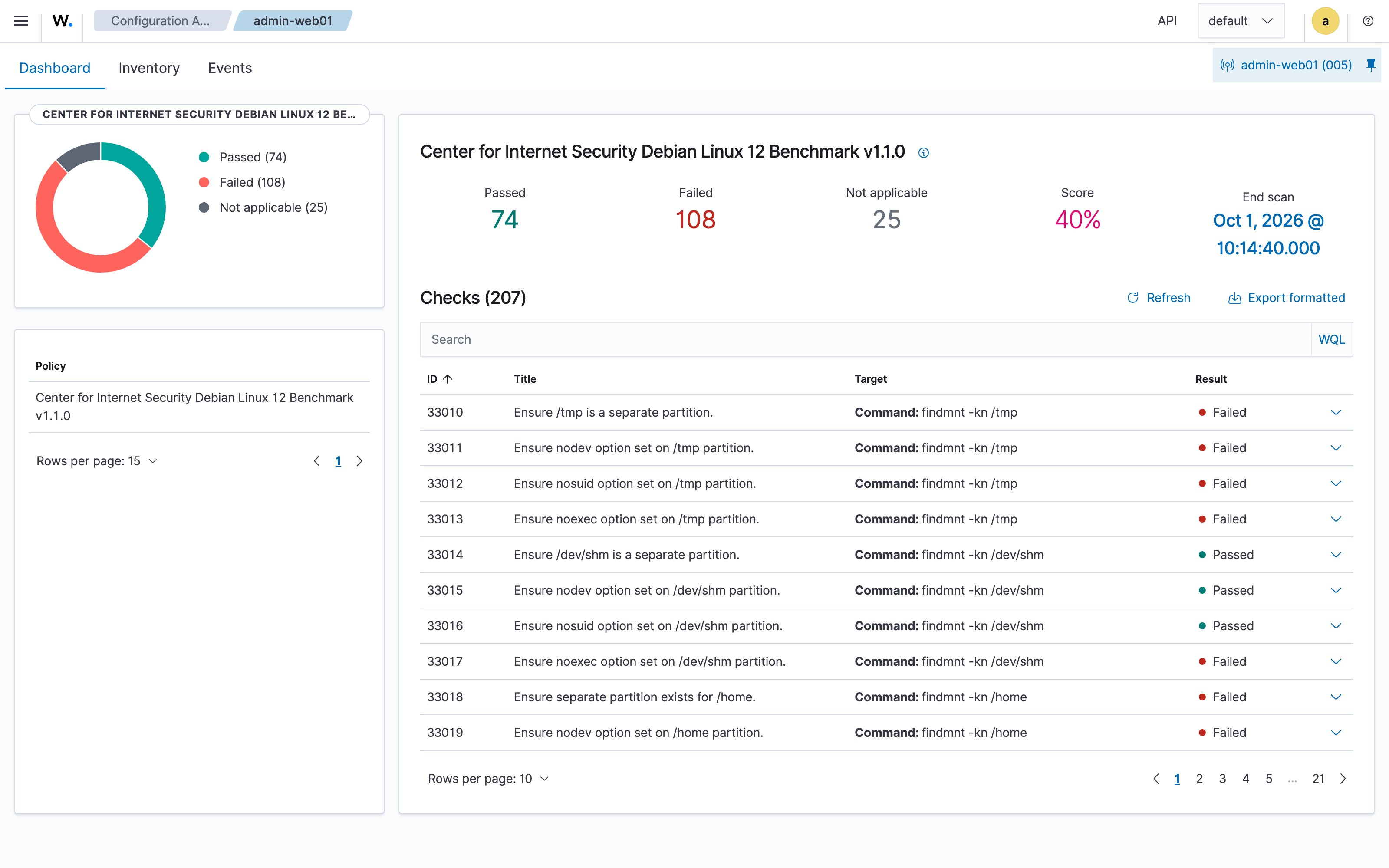
Configuration Assessment runs the CIS Debian Linux 12 Benchmark against each agent.
web01 scores 40%: 74 checks passed and 108 failed, starting with /tmp not being a separate partition.
That’s expected for a stock template that nobody has hardened, but now the gap has a number, which gives a later hardening pass a baseline to measure against.
The template is stale. Vulnerability Detection reports 1,966 critical and 9,644 high findings across the five agents, and the top packages are the kernel images that came with the template. The totals overstate the distinct problems, because the same CVE counts once for each affected package on each agent. What they do show is that every VM in the range starts from the same unpatched image.
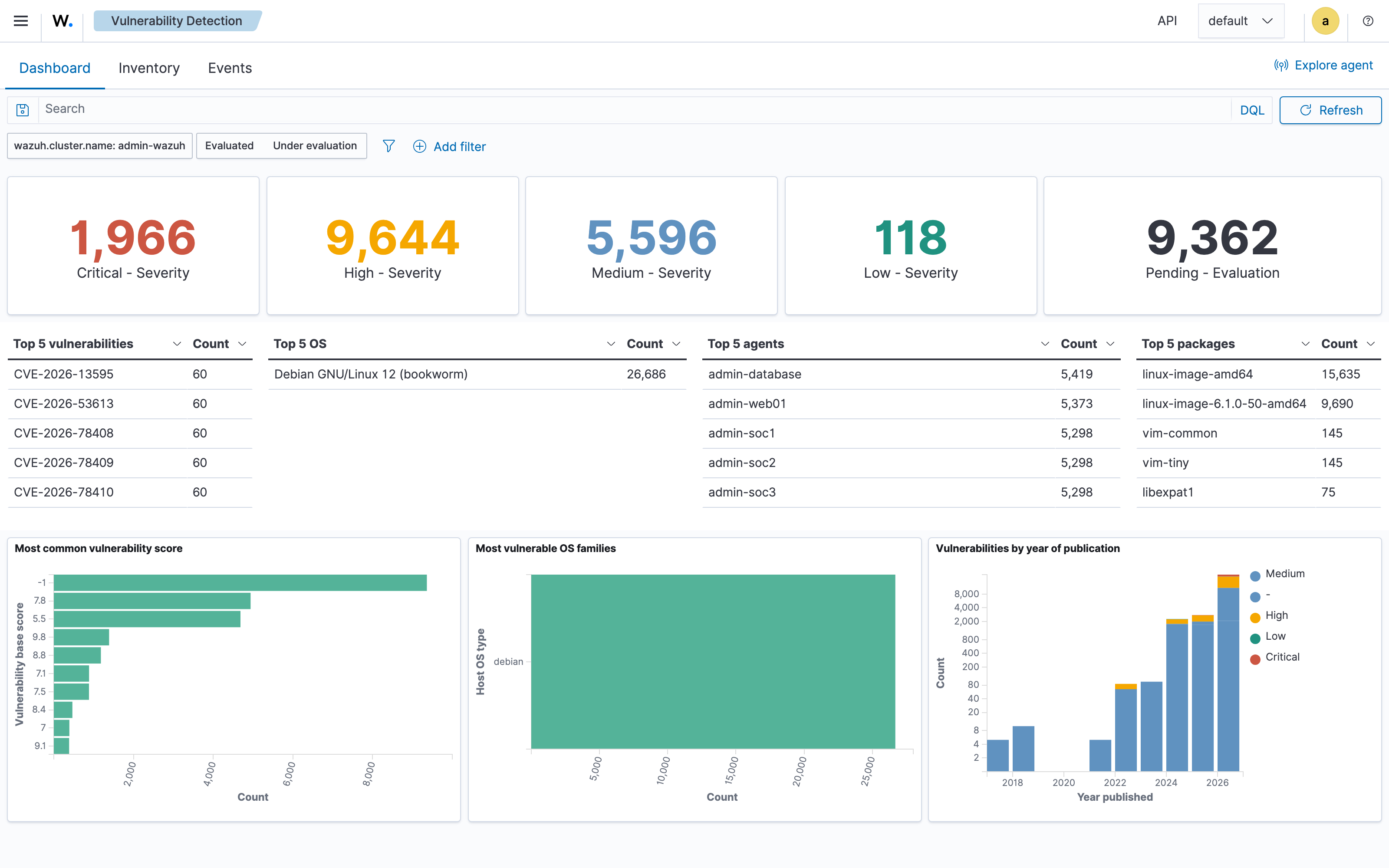
I captured these views with a short Playwright script that logs in to the dashboard and screenshots each page. The script reads the dashboard password over SSH into an environment variable, so the password never lands on disk or in a screenshot.
Entry 5 - Reviewing the build, and a version pin that went wrong
With the range doing what I wanted, I spent the last day on the parts I had been skipping. Everything so far had been written fast and never committed, so the first job was to commit the working state untouched and then review it as a whole.
The review turned up the usual small things.
Hostnames like admin-database were hard-coded in half a dozen places, so the config only worked for a range owned by admin.
The capture script had a fixed list of VM IDs from before the SOC VLAN existed, so it silently skipped the Wazuh VM.
Both were easy to fix and neither is interesting.
The interesting one was the Wazuh agents.
Pinning the agents, and what the pin did
The agent role installed wazuh-agent from the 4.x apt repository with no version constraint, which means every rebuilt agent gets whatever is newest.
Wazuh does not support an agent that is newer than its manager, so that is a real problem waiting for a release.
The fix I reached for was pinning the agents to the manager’s release line, 4.14.*, and holding the package so a routine apt upgrade cannot move it.
I deployed the fix and every agent came back reporting changed.
I had expected a pin on a host that was already in the desired state to report nothing to do.
The reason is that apt treats 4.14.* as permission to install the newest patch release in that line.
My manager was on 4.14.6, the repository was serving 4.14.7, and my fix had upgraded all five agents past their manager.
The pin was meant to keep the agents in step with the manager, and the result was the opposite: every agent ended up a patch release ahead of it.
The deeper issue is that the manager and the agents come from two different places.
The installation assistant hard-codes the exact version it installs, and the copy served from packages.wazuh.com/4.14/ is refreshed with every patch release.
The agents install from the apt repository, which always offers the newest patch in the line.
Those two sources disagree the moment a release lands between one install and the next, so no version written into the config is reliably correct.
So the manager itself has to be the source of truth:
- In the range config, every
ludus_wazuh_agententry now declaresdepends_ontheludus_wazuhrole on the Wazuh VM, so the manager is always provisioned before any agent. - The agent role reads the manager’s installed package version directly from the manager host, installs exactly that version (downgrading if needed), and holds it.
- It then asserts that the two match, so a mismatch fails the deploy on the host that has the problem.
That worked, and the repair was visible in the log:
1
2
3
manager 4.14.6-1; agents ['admin-soc3 4.14.7', ... ]
changed: [admin-soc3]
"msg": "wazuh-agent 4.14.6-1 matches the manager"
Where the check belongs
My first attempt at the version check lived in the manager role, which felt natural: the manager knows every agent’s version, so let it assert that none is ahead.
It failed the deploy, correctly, on exactly the skew described above. It also failed it before the agent role ran, and that is the role that installs the matching version. Because the check ran ahead of the repair, the deploy stopped before it could correct itself.
The manager role now reports the mismatch as a warning and the assertion lives in the agent role, on the host it applies to, after the install that resolves it. The check is the same; moving it changes what it does.
Getting direct access to the VMs
Everything above was diagnosed by reading Ansible output, because the range VMs were only reachable through Ludus. One deploy per question is a slow way to inspect a machine.
So the last piece was a small ludus_ssh_keys role that installs a dedicated lab key for the debian user on all six VMs.
It only ever adds keys, so it cannot lock Ludus out of its own range, and Ludus keeps using the template password from its inventory.
Now the range answers directly:
1
2
3
4
$ ssh 10.1.30.10 sudo /var/ossec/bin/agent_control -l
   ID: 000, Name: admin-wazuh (server), IP: 127.0.0.1, Active/Local
   ID: 001, Name: admin-soc3, IP: any, Active
   ...
Two caveats come with that design, and I want to be up front about them.
Because Ludus still logs in with the template password, SSH password authentication stays on.
The key makes access more convenient and does nothing to harden the VMs: anyone on the VPN who knows the template’s default password can still log in.
And because the role only adds keys, removing a key from the config doesn’t remove it from the VMs.
Revoking a laptop means deleting its key from ~debian/.ssh/authorized_keys by hand, or changing the role to manage the full key set.
What I am taking from this entry
A deploy that ends in SUCCESS told me the tasks ran.
It did not tell me the range was in the state I intended, and here the same green deploy was making things worse.
What caught it was re-running the deploy and reading what changed.
On this range I have come to treat a second run reporting changed=0 as the real signal that a role is finished, and a role that keeps reporting changed as one that is still doing something I have not understood yet.
Adding an assertion that states the invariant on the host that owns it is what turned that habit into something the range checks for me.
What’s next
- Add a passive sensor (Zeek or Suricata) on the mirror NIC and capture a real analyst -> portal -> database session.
- Restrict LAN egress to the internet (DMZ-only internet) as a post-deploy hardening pass.
- Turn on Wazuh enrollment passwords and pin the installer’s checksum.
- Patch and harden the base template, then compare the CIS score and vulnerability counts against the first-day numbers above.
- Rebuild the Claude side with a non-admin Ludus user and without bypass mode, as described in Part 1.
- Consider swapping the headless analyst boxes for desktop workstations.
- Snapshot the range and try Ludus testing mode for a repeatable exercise.
- Run an actual attack against web01 (or brute-force an analyst) and watch it raise a Wazuh alert, so the SIEM proves it can detect something.
- Upgrade the Wazuh manager to the current patch release, then let the agents follow it, to exercise the version flow in the other direction.
- Forward the tap/mirror traffic into Wazuh (or a Suricata sensor beside it) so network and host telemetry land in one place.
References
This series
Wazuh
- Wazuh
- Quickstart and the all-in-one installation assistant
- Wazuh agent installation and agent/manager compatibility
- Agent enrollment and password-based enrollment
- Wazuh package list
- CIS Debian Linux Benchmarks
- Playwright, used to capture the dashboard screenshots
Ludus and Claude
- Ludus and its documentation
- Ludus roles and snapshots
- Claude Code, its permissions, and permission modes
Infrastructure and tooling
- Ansible and its
get_urlmodule - Proxmox VE
- Zeek and Suricata